MLOps for Computer Vision: The Complete Guide
What CVOps actually means, why classical MLOps tooling breaks down on image and video data, and how the six stages of a computer vision pipeline fit together in production.
Picsellia Team
·6 min read
Put your MLOps into practice
Stop stitching tools together. Get an end-to-end CV platform with built-in automation.
Search "what is MLOps" and you'll get a dozen answers built around tabular data and SQL warehouses. Computer vision doesn't work that way. A CV pipeline moves petabytes of images and video through annotation, augmentation, and GPU-heavy training before it ever reaches production — and once it's there, the failure modes (a camera angle that shifts, lighting that changes season to season, a new defect type nobody labeled) look nothing like the drift you'd catch in a churn model.
This guide is the map. It covers what MLOps for computer vision — often shortened to CVOps — actually means, why generic MLOps tooling struggles with image and video workloads, and how the six stages of a CV pipeline fit together. Each section links out to a deeper, more specific article if you want to go further.
What is CVOps?
CVOps is MLOps applied to the specific constraints of visual data: large binary files instead of rows, annotation as a first-class pipeline step instead of an afterthought, GPU scheduling instead of CPU batch jobs, and production monitoring that has to reason about pixels, not just prediction distributions.
The goal is the same as MLOps anywhere — get a model that works into production, reliably, and keep it working as the world changes. What differs is how you get there. How to Apply MLOps to Computer Vision? Introducing CVOps goes deeper on where the two disciplines diverge in practice.
Why classical MLOps tools don't fit
Most MLOps platforms were built for tabular ML: DVC and LakeFS for versioning rows, Weights & Biases or MLflow for tracking runs, a REST endpoint for serving. Stitch those together for computer vision and you hit friction almost immediately:
- Data versioning means diffing datasets of images and annotations, not rows and columns — tools built for the latter don't version the former cleanly.
- Annotation isn't optional. It's a scheduled, quality-controlled pipeline stage with its own tooling, reviewers, and consensus workflows — most MLOps stacks have no concept of it at all.
- Training is GPU-bound and iterative, cycling through augmentation and hyperparameter sweeps in a way batch tabular training rarely does.
- Monitoring needs to catch visual drift — a camera repositioned, a new lighting condition, a defect class that's never been seen — not just a shift in a numeric feature distribution.
The result, if you bolt a generic stack onto a CV workload, is tool sprawl: one system for storage, another for annotation, another for tracking, another for serving, with no shared lineage between them. Why Do Classical MLOps Tools Not Fit Computer Vision? breaks this down tool by tool.
The maturity curve
Teams tend to land on one of three levels, whatever platform they're using:
- Level 0 — everything manual. Data pulled and cleaned by hand, models trained in notebooks, deployment is someone SCP-ing a checkpoint to a server.
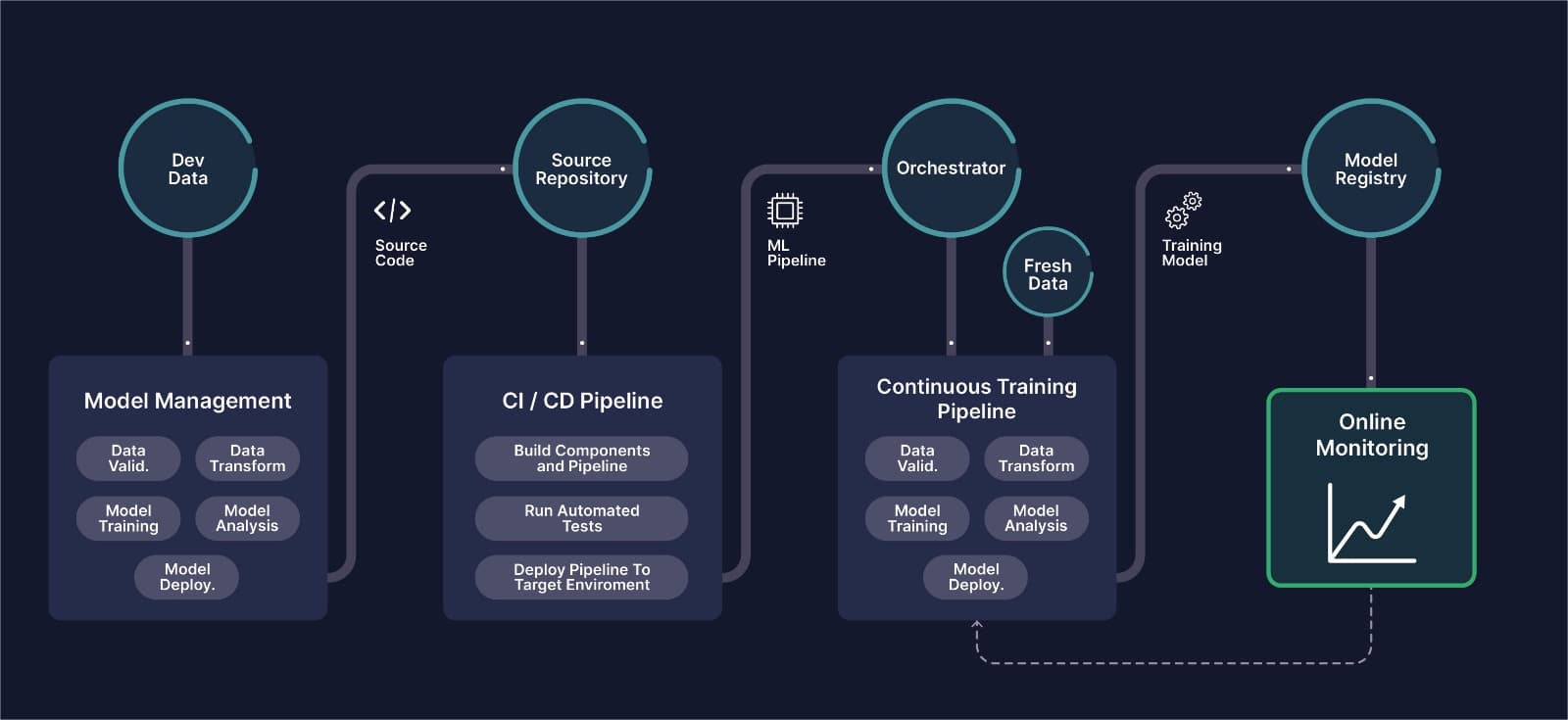
- Level 1 — the training pipeline is automated (continuous training), but deployment, monitoring, and data collection are still separate, manual steps stitched together after the fact.
- Level 2 — the ML pipeline mirrors a real software pipeline: continuous integration and delivery for models, automatic retraining triggered by monitored drift, and a single system tracking data, model, and deployment lineage together.
Most teams starting a CV program are somewhere around Level 0 or 1 — not because they lack the skill, but because generic tooling makes Level 2 disproportionately expensive to build in-house. What is MLOps? And Why is it Important? and the Road to MLOps series walk through each level in more depth, including what Level 1 and Level 2 look like concretely for a CV team.
The six stages of a CV pipeline
Whatever platform you use, a production computer vision system moves through the same six stages. Here's what each one actually involves, and where the tooling tends to break down if it wasn't built for images and video in the first place.
1. Data management
Ingesting, storing, and versioning images and video at scale — with the ability to slice a dataset by tag, metadata, or visual similarity rather than just a folder structure. This is also where deduplication and data quality checks belong, before a single image reaches an annotator. See Datalake and Dataset Management for how this looks in practice.
2. Annotation
Bounding boxes, polygons, segmentation masks, and keypoints, produced by a mix of human annotators and AI-assisted pre-labeling, with a review and consensus workflow that catches labeling errors before they poison a training run. Annotation quality is usually the single biggest lever on final model performance — and the easiest stage to under-invest in. See Labeling Tool and Annotation Campaigns.
3. Training & experimentation
GPU-scheduled training runs with full experiment tracking — which dataset version, which hyperparameters, which augmentation pipeline produced which checkpoint. Reproducibility here is what makes Level 2 maturity possible: without it, "why did this model regress" is unanswerable. See AI Laboratory and Experiment Tracking, and End-to-End Repeatable MLOps for Computer Vision for what reproducibility looks like end to end.
4. Deployment
Serving a model behind an API, with autoscaling, GPU or CPU inference depending on latency needs, and support for cloud, edge, or on-premise targets depending on where the data has to stay. See Model Deployment and Automated Pipelines.
5. Monitoring
Every prediction logged, with drift detection that watches for the visual world changing out from under the model — not just a numeric metric moving. This is the stage classical MLOps tooling handles worst, because "drift" for images means something different than "drift" for a feature vector. See Model Monitoring.
6. Compliance & governance
Audit trails, role-based access, data residency, and — increasingly, under the EU AI Act — documentation of how a model was trained and validated. For regulated industries this isn't optional, and it's the stage most likely to be missing entirely from a stack assembled from point tools. See Enterprise.
Build vs. buy
Once the six stages are mapped out, the real decision is whether to assemble them from separate tools or run them on one platform with shared lineage across every stage. MLOps Platform: Build vs. Buy? What You Must Know covers the tradeoff in detail — including the ongoing maintenance cost of a stitched-together stack that most teams underestimate at the start. Creating a CVOps Platform covers how Picsellia approaches this specifically.
Where to go next
If you're evaluating whether to consolidate your CV stack, start a free trial or book a demo to see the six stages above running on one platform, with one lineage graph from raw image to production prediction.
Related from Picsellia
Automate your ML pipelines
Set up continuous training and deployment with automated triggers, shadow deployments, and feedback loops.
Explore Automated PipelinesAnnotate faster with AI assistance
Picsellia's labeling tool supports bounding boxes, polygons, and segmentation masks with built-in AI assistance to speed up annotation.
Explore the Labeling ToolStay up to date
Get the latest posts on computer vision, MLOps, and AI delivered to your inbox.
Related articles
The Cost of Tool-Switching in Computer Vision Pipelines
Tool overhead isn't additive — it compounds. Learn how context switching between ML tools costs CV teams hundreds of engineering hours per year.

Top 5 experiment tracking tools for Computer vision
AI is typically achieved through iterative and experimental processes such as changing the model, running multiple experiments, and examining the results.
Why Do Classical MLOps Tools Not Fit Computer Vision?
Computer vision pipelines require a set of processes that are exclusive to Computer Vision. This is where CVOps comes to play.